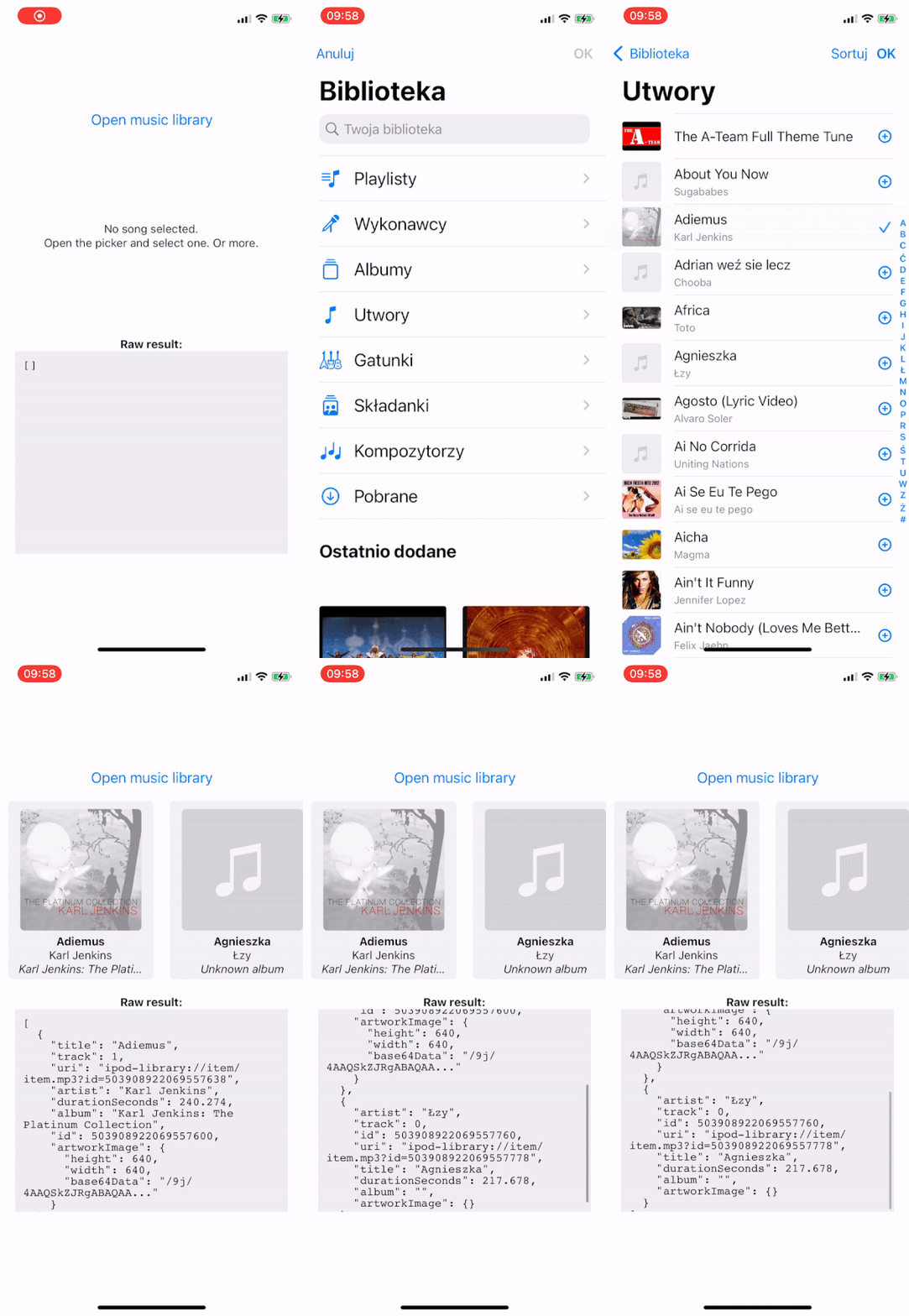
A music picker library for React Native. Provides access to the system's UI for selecting songs from the phone's music library.
| Android Device |
Android Emulator |
iOS Device |
iOS Simulator |
Web | Expo Go |
|---|---|---|---|---|---|
| ✅ | ✅ | ✅ | ❌ | ✅ | ❌ |
- ✅ You can use this library with Expo Development Builds. It includes a config plugin.
- ❌ This library can't be used in the "Expo Go" app because it requires custom native code.
This library requires Expo SDK 45 or newer
npx expo install expo-music-pickerOnce the library is installed, create a new Development Build.
If you're installing this in a bare React Native app, you will need to have the expo package installed and configured.
Add expo-music-picker to the plugins array of your app.json or app.config.js and then create a new Development Build to apply the changes.
{
  "expo": {
    "plugins": [
      "expo-music-picker",
      { "musicLibraryPermission": "The app accesses your music to play it" }
    ]
  }
}
The config plugin has the following options:
| Name | Type | Explanation | Required | Default Value |
|---|---|---|---|---|
musicLibraryPermission |
string |
🍏 iOS only A string to set the NSAppleMusicUsageDescription permission message. |
❌ | "Allow $(PRODUCT_NAME) to access your music library" |
This is only required for usage in bare React Native apps.
Add NSAppleMusicUsageDescription key to your Info.plist:
<key>NSAppleMusicUsageDescription</key>
<string>Give $(PRODUCT_NAME) permission to access your music library</string>
Run npx pod-install after installing the npm package.
This is only required for usage in bare React Native apps.
This package automatically adds the READ_EXTERNAL_STORAGE permission. It is used when picking music from the phone's library.
<!-- Added permissions -->
<uses-permission android:name="android.permission.READ_EXTERNAL_STORAGE" />import { useState } from "react";
import { Image, Text, View, Button } from "react-native";
import * as MusicPicker from "expo-music-picker";
export default function App() {
const [item, setItem] = useState<MusicPicker.MusicItem | null>();
const pickMediaAsync = async () => {
try {
// Request permissions
const permissionResult = await MusicPicker.requestPermissionsAsync();
if (!permissionResult.granted) {
console.warn("No permission");
return;
}
// Open the music picker
const result = await MusicPicker.openMusicLibraryAsync({
allowMultipleSelection: true,
includeArtworkImage: true,
});
// Process the result
console.log(result);
if (!result.cancelled) {
const [firstItem] = result.items;
setItem(firstItem ?? null);
}
} catch (e) {
console.warn("Exception occurred when picking music:", e);
}
};
const artworkData = item?.artworkImage?.base64Data;
return (
<View style={{ flex: 1, alignItems: "center", justifyContent: "center" }}>
<Button title="Open music library" onPress={pickMediaAsync} />
<Text>
{item ? `Song: ${item.artist} - ${item.title}` : "No song selected"}
</Text>
{artworkData && (
<Image
source={{ uri: `data:image/jpeg;base64,${artworkData}` }}
style={{ width: 200, height: 200 }}
resizeMode="contain"
/>
)}
</View>
);
}import * as MusicPicker from `expo-music-picker`;Asks the user to grant permissions for accessing user's music library.
- 🍏 On iOS this is required to open the picker.
- 🤖 On Android this is not required, but recommended to get the most accurate results. Only basic metadata will be retrieved without that permission.
- 🌐 On Web this does nothing - the permission is always granted.
Returns: A promise that fulfills with Expo standard permission response object.
Checks user's permissions for accessing music library.
On Web, this does nothing - the permission is always granted.
Returns: A promise that fulfills with Expo standard permission response object.
Display the system UI for choosing a song / audio file from the phone's library.
On Web: The system UI can only be shown after user activation (e.g. a button press), otherwise the browser will block the request without a warning.
Arguments:
options- Picker configuration options. An object of typeMusicPickerOptions.
Returns: An object of type PickerResult.
Options for the picker:
| Name | Type | Explanation | Required | Default Value |
|---|---|---|---|---|
allowMultipleSelection |
boolean |
Whether or not to allow selecting multiple media files at once. | ❌ | false |
includeArtworkImage |
boolean |
Whether to also include the artwork image dimensions and its data in Base64 format. | ❌ | false |
showCloudItems |
boolean |
🍏 iOS only When set to true, the picker shows available iCloud Music Library items, including purchased items, imported content, and Apple Music subscription content. When set to false, the picker only shows content downloaded to the device. |
❌ | true |
userPrompt |
string | undefined |
🍏 iOS only A prompt, for the user, that appears above the navigation bar buttons on the picker screen. | ❌ | undefined |
A picking result resolved by openMusicLibraryAsync.
type PickerResult =
  | { cancelled: true }
  | { cancelled: false; items: MusicItem[] };
When the cancelled property is false, the picked music items are available under the items property.
Represents a single picked music item.
| Name | Type | Description |
|---|---|---|
id |
number |
Unique asset ID. On Android, this value can be used to access the asset with expo-media-library. If the ID cannot be obtained, the value is -1. |
uri |
string |
URI of the asset. It can be used to play selected media with expo-av. |
title |
string? |
The title or name of the music item. |
artist |
string? |
The performing artist the music item. |
album |
string? |
The title of an album. |
durationSeconds |
number |
The duration of the music item in seconds. Returns -1 if unavailable. |
track |
number? |
The track number of the media item, for a media item that is part of an album. |
year |
number? |
🤖 🌐 Android & Web only. Year of the song. |
fileName |
string? |
🤖 Android only. The filename of the media. Example: toto_africa.mp3 |
artworkImage |
ArtworkImage? |
When options.includeArtworkImage is true and the music item has attached artwork image, it can be accessed by this property. See ArtworkImage type below. |
| Name | Type | Description |
|---|---|---|
width |
number |
Original width of the artwork image. |
height |
number |
Original height of the artwork image. |
base64Data |
string |
Base64-encoded image data. Does NOT include the data:...;base64, prefix. |